
Where to find comments
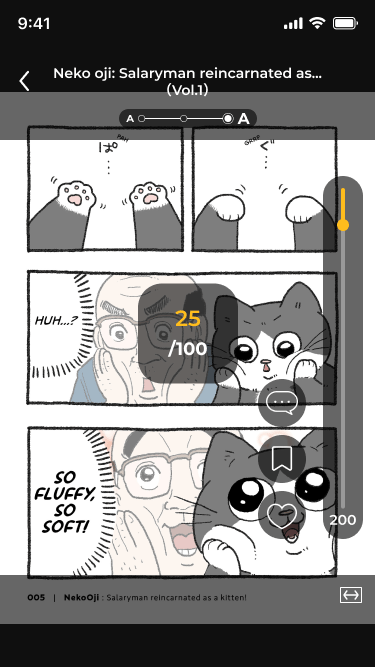
You can open comments from two places:- The reader: Tap the comment icon in the side menu while reading.
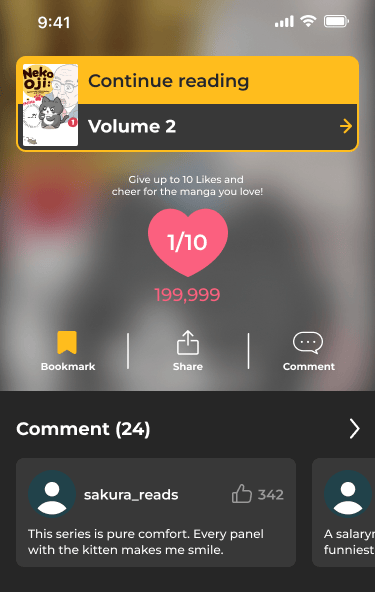
- The completion screen: When you finish a chapter or volume, tap Comment or one of the comment cards below it.

How to post a comment
1
Tap Post Comment
Open the comments for a volume or chapter and tap Post Comment at the bottom of the screen.
2
Write your comment
Comments can be up to 200 characters. When you’re done, tap Post.
3
Set your name (first time only)
The first time you post, a short reminder of the community guidelines appears. Tap Got It to continue. If you haven’t set a name yet, enter one and tap Submit. Your name appears with your comments.
Comments can’t include links or URLs. Comments that contain inappropriate words can’t be posted either.
Liking comments
Tap the thumbs-up icon on a comment to like it. Tap it again to remove your like. You can like each comment once.Deleting your comments
Tap Delete under your comment, then tap Delete again to confirm. Comments can’t be edited after posting. To change a comment, delete it and post a new one.Reporting a comment
If you see a comment that breaks the community guidelines, tap Report under it, choose a reason, and tap Report this comment. Once you report a comment, it’s hidden from your view.Viewing other readers’ profiles
Tap a reader’s icon to see their profile, including their name and the badges they’ve earned. To learn more about badges, see Collecting badges.Community guidelines
Keep comments kind, relevant, and spoiler-free. Don’t post:- Harassment, hate speech, or explicit content
- Personal or private information
- Spam, promotions, or links
- Spoilers for later chapters
FAQ
- Q: Do I need an account to comment?
- A: No. You only need to set a name the first time you post.
- Q: Can I edit a comment after posting?
- A: No. Delete the comment and post a new one.
- Q: Why can’t I post my comment?
- A: Comments can’t be posted if they’re over 200 characters or include links or inappropriate words. Edit your comment and try again.
- Q: Can I change my name?
- A: Yes. Open your Profile from the Home screen and tap the edit button next to your name.
- Q: Who can see my comments?
- A: Everyone who opens the comments for that volume or chapter can see them, along with your name and profile icon.